



Description
Visio 2019 Professional for Creating Flowcharts, Diagrams, and Sketches on Windows PC (1 Device) – Includes both non-transferable key and transferable Microsoft Account key. Please select the key type that matches your usage.
Create flowcharts and diagrams
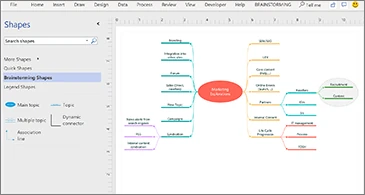
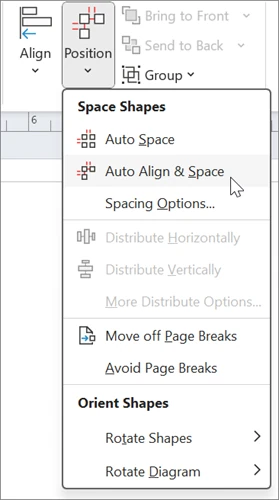
Use shapes and connectors to create flowcharts, system diagrams, layouts, or screen sketches. Arrange elements using templates and alignment tools. Ideal for documents that require more relationship visualization than text lists.
This product is for Windows PCs. Please check the installed version and existing Office versions. Select 32/64-bit to match. Not for Visio Online and does not include additional cloud services. If you have sample files from different versions, please check compatibility before ordering.
Options, Pricing, and Key Conditions
| Options | Standard Price | Sale Price |
|---|---|---|
| Microsoft account-bound key can be moved to another machine | 8,900 THB | 980 THB |
| Non-transferable | 3,500 THB | 649 baht |
Lifetime and Device Transfer Conditions
Microsoft Account-bound, device transferable
Permanently licensed version purchased, tied to the buyer’s Microsoft account, not a monthly or annual subscription Use on 1 computer at a time. Transfers are subject to the licence terms: remove it from the original computer first. Free upgrades to newer versions are not included.
Only transfer when necessary and follow Microsoft’s steps. Do not share your account password with others. Keep recovery data ready. Permanently licensed rights are separate from the key warranty period and software support duration
Non-transferable
Lifetime license, no expiration date, not a monthly or annual subscription The shop provides a 1-year warranty from the date of purchase. The actual usage period may be 2–5 years, but this is uncertain and not guaranteed to last until that period.
Valid for 1 device, cannot be moved, including changing the motherboard (MB), SSD, or HDD where the system/program is installed. If the device is changed, the original key cannot be used for activation. Re-installation is only possible on the original device that has not had its hardware changed.
Transfers should not be more frequent than 1 time in 90 days for a transferable key. Must be removed from the original device first and comply with license conditions: do not use on multiple devices simultaneously
First activation
First activation must be completed within 15 days After receiving the key, it is recommended to prepare the device and activate immediately If the key expires and becomes unusable, the store is not responsible for keys released beyond the specified period. The first activation is a separate matter from the usage period after successful activation.
Sample usage
Microsoft documentation image. Some UI elements and tools may differ based on version, language, and installed updates. Please check the product name in the image description.

What do you receive and how to receive the product
The key or registration link is delivered With installation-file links and instructions, delivered by email within 24 working hours No disc or box will be shipped. Please ensure your email is correct and check your spam folder.
Buyers must install it themselves. You should back up your data and prepare your machine before receiving the key. Use Microsoft files according to the manual; do not use cracked files or modified programs. If an error message occurs, send a screenshot of only the relevant part along with the order number, while hiding the key and personal information before sending.
Check the existing program before installation
If Office, Project, or Visio is already installed, you must check the 32/64-bit version, installation method, and compatible versions first. Matching version names alone do not guarantee compatibility in all cases. Do not install alongside cracked or counterfeit programs.
If software conflicts prevent installation, you may need to uninstall the existing programs and reinstall compatible versions. Have the existing licences and installers ready first. The store is not responsible for damage to existing programs caused by installation conflicts. If you are not prepared to resolve the system issues as instructed and cannot use the product, this listing does not provide a refund because the system was not ready.
This item is for personal use. If you wish to use it in a company or organization with license documents and a tax invoice, please contact the shop to select an enterprise item before ordering. Do not use the price on this page as a business license quotation.
Select the product that matches the device.
View Project for project planning , Office Suite for Documents And compare the version with the license type before purchasing. Each item has different conditions.
For usage instructions, see Guide to Creating Flowcharts in Visio If the steps on the device differ from the manual, note the model name and the messages found to inquire before proceeding.
If unsure whether the device matches the correct model, send the system name and original program to inquire with SV Thailand at [email protected] You can do so before ordering; do not send passwords or keys to the store.





Microsoft Visio Professional 2019 — Choose Key Type — Reviews (0)
No product reviews yet.