


Description
Microsoft Visio Professional 2021 for creating flowcharts, diagrams and plans on 1 Windows PC. Receive a digital key by email within 24 hours. Suitable for personal users who need to present information visually and specifically require the 2021 version.
Licence duration and key warranty
Non-transferable key with no fixed expiry date; not a monthly or annual subscription. Use may continue after the warranty period if the key and original computer remain usable under the product terms.
The store provides a 1-year key warranty from the order date. Actual use may last 2–5 years, but this is uncertain and is not guaranteed. Transfer and motherboard/SSD replacement restrictions still apply as stated in this listing.
What diagrams can Visio 2021 create?
Use shapes and templates to lay out processes, floor plans or network diagrams, then connect shapes to explain relationships. This helps when long text makes a sequence or structure difficult to follow.
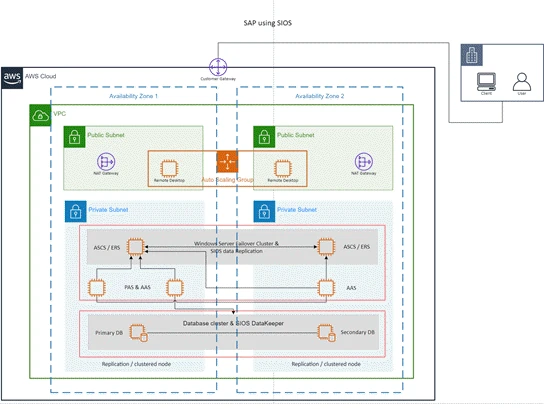
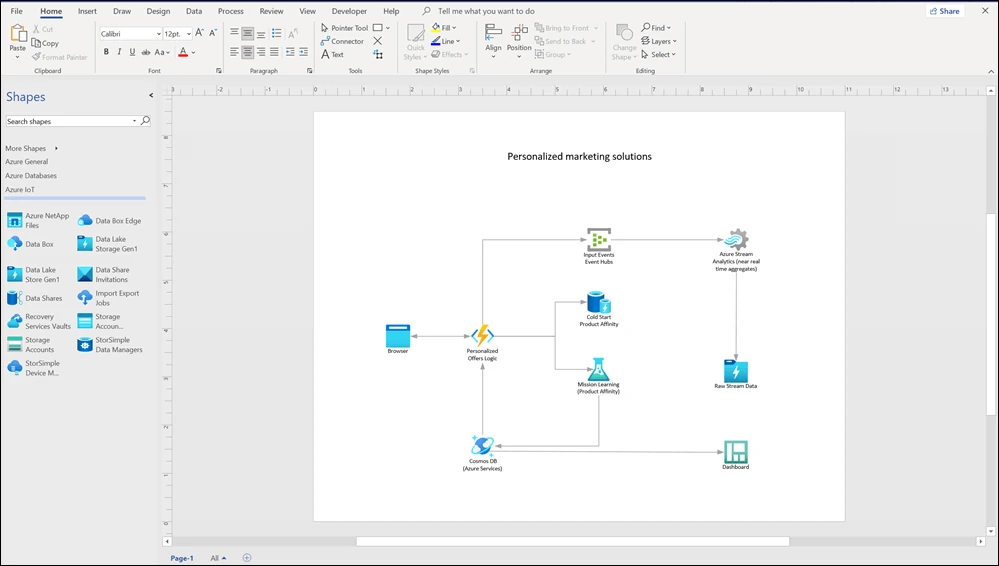
Professional 2021 includes updated shapes and templates, including Azure and AWS examples described by Microsoft. Some functions depend on the data sources and services used. Read Microsoft’s feature details to compare them with your intended work before buying.
Screenshots of the software in use
Screenshots show the actual software. Its appearance may vary by language, minor version and updates.

Check Windows and Office before buying
This installer is for Windows 10 or Windows 11 on a PC. It is not for macOS and does not support Windows 7. Choose 32-bit or 64-bit to match the existing Office installation. Do not choose a different architecture merely because the computer supports 64-bit.
If you already have Office 2019 , Office 2021 or Microsoft 365 installed, also check the version, installation method and update channel. Matching edition names alone do not guarantee compatibility in every case. You can send the store an Account-page screenshot with personal information hidden for checking.
Key terms and transfer restrictions
This key is for personal use on 1 PC and cannot be transferred to another computer. Reinstallation is limited to the original computer under the key terms. If the computer fails or the motherboard, SSD or HDD must be replaced, continued activation will not be possible.
This item is not offered for commercial use. If buying for a company or requiring licence documentation and a tax invoice, explain your use to the store so it can suggest an organisational licence. Do not treat this page’s price as a quotation for business licensing.
What is delivered, and how do I install it?
Receive a digital key, a Microsoft installer link and instructions by email within 24 hours under this listing’s terms. No disc or physical box is shipped. Please enter the correct email address and check your spam folder.
You install and activate the software yourself, so basic software-installation skills are needed. Back up important data first. Use the Microsoft files specified in the guide, not cracked or modified installers. Keep the order email for support.
First activation and key care
The store provides a 1-year key warranty from the order date under this listing’s terms. Activate as soon as the email arrives and test before relying on the software. The store’s key warranty is separate from Microsoft’s software-support period.
Activate for the first time within 3–5 days of receiving the key, and no later than 5 days. If the deadline is missed and the key cannot be activated, this listing does not cover that situation. Install and check activation as soon as the email arrives.
Installation conflicts with existing software
If installation reports an error such as 30053-44, you may need to uninstall conflicting Office, Project or Visio software, then reinstall compatible versions. Have the installers and licences for your existing software ready before starting.
Do not install alongside cracked software. The store is not responsible for damage to existing programs caused by installation conflicts. If you cannot uninstall or reinstall as required and the product cannot be used because the system was not prepared, this listing does not provide a refund on that basis. Check compatibility before ordering.
How does Visio differ from Project and Office?
Visio focuses on diagrams, while Microsoft Project Professional 2021 focuses on schedules and task sequencing. If you need Word, Excel or PowerPoint, see Office Professional Plus 2021 separately. These programs are not included in the Visio key.
Compare related products in the Office category If sharing files with users of other Visio versions, check the required file formats and features first. This key does not include Visio web services or multi-device rights.
If unsure whether your computer is suitable, send the installed Windows and Office edition names to SV Thailand at [email protected] before ordering. Do not send passwords or your existing keys to the store.



Microsoft Visio Professional 2021 Digital Key — 1 PC — Reviews (0)
No product reviews yet.